How to defrag hard drive Windows Vista
By Livia | 19/Aug/2026
If you want to speed up your Windows and strengthen the efficiency, defrag Windows hard drive regularly is helpful. What`s more, defrag Windows hard drive means delete the unless files which will save the space which will expand the RAM of your Windows, in some way, if you need to install the necessary new program, you can use the space left by the defrag to set the data of the program up. Windows hard drive defrag is helpful for you to manage all the files in a better way through removing all the gaps between each hard drives and folders, after that Windows will automatically manage all the files again into the most efficient way-this is why I said hard drive defragment helps to save RAM and memory.
Windows Vista is a kind of popular used Windows operation among Windows users. So if you are using a Windows Vista, you can also get the better efficiency by defrag hard drive on your Windows Vista.
The normal way for Windows Vista users to defrag hard drive can be the route below:
Open Start-> Go to Control Panel-> Navigate to System and Maintenance-> Choose Defragment Your Hard Drive in the Administrative Tools.
Then you may get a analysis of defragment proceed and get the report when it finished. Now I will show you more details about how to defrag Windows Vista with picture, for you to understand better.
Again, you need to follow the directory to start to defrag your Windows Vista hard drive:
Open Start-> Go to Control Panel-> Navigate to System and Maintenance-> Choose Defragment Your Hard Drive in the Administrative Tools. Then wait for the analysis completely.
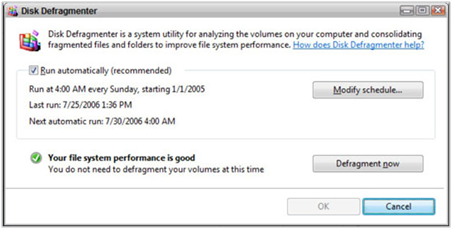
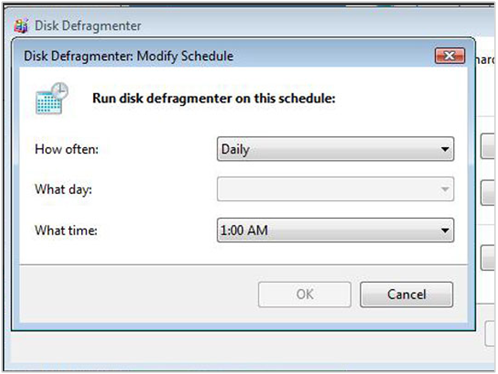
If you need to create a defragmentation schedule, click Modify Schedule or Configure schedule button-> click Defragment now or Defragment disk.
Do not use the PC while the Disk Defragmenter is running.
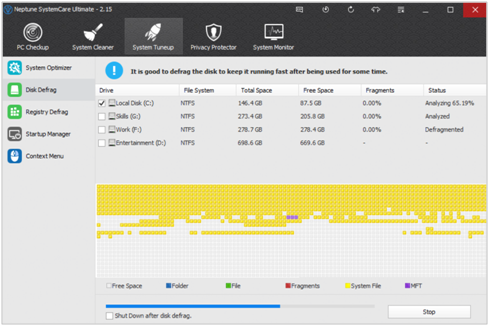
It is also alternatively for you to defrag Windows Vista with the PC optimization tool, which can be more convenient and easy for you. In this way, the Neptune SystemCare Ultimate is highly recommended. Now let`s see how to defrag Windows Vista with it.
Step1. You need to download, install and launch Neptune SystemCare Ultimate in your Windows Vista.
Step2. Select the hard disk or all of them and then tap on the green Defragment button. Wait a few seconds for the analyzing and defragmenting.
Step3. Done.